AI Fundamentals — A Simple Visual Guide
Learning path: Understand the map → learn how models learn → understand parameters and compute → follow the model-building pipeline → understand tokens, context, embeddings and RAG → understand hallucinations → connect AI to real software systems.
This resource is based on the three provided AI Fundamentals PDFs. It combines their overlapping ideas into one revision-friendly guide while keeping the original terminology and framing.
1. What Is AI?
Artificial Intelligence (AI) is the broad idea of machines performing tasks that simulate human cognitive abilities.
AI is an umbrella term, not one single technology.
A useful hierarchy from the notes is:
Artificial Intelligence (AI)
│
└── Machine Learning (ML)
    │
    └── Deep Learning (DL)
        │
        └── Generative AI / LLMs
Visual: AI hierarchy. Source: Wikimedia Commons — CC BY-SA 4.0.
The layers
| Layer | Simple meaning |
|---|---|
| AI | The broad field of making machines perform tasks associated with human intelligence. |
| Machine Learning | Systems learn statistical patterns from data instead of relying only on hand-written rules. |
| Deep Learning | ML using multi-layer neural networks to learn representations from data. |
| Generative AI / LLMs | Models that can generate new content such as text or code. |
The important idea is:
LLMs are part of a much larger AI → ML → Deep Learning family.
The source notes describe Deep Learning as multi-layered artificial neural networks and Generative AI/LLMs as specialized deep-learning models trained to generate content. fileciteturn1file2L1-L1
2. Why Did Learning-Based AI Matter?
An early approach to AI was to explicitly write rules.
For example:
IF temperature > 30°C
→ turn ON the AC
This works when the rules are simple and predictable.
But real-world inputs can be messy.
Imagine trying to write rules for:
50,000 photos
→ identify whether each contains a cat
Writing every possible rule manually becomes impractical.
Rule-Based vs Learning-Based
| Rule-Based | Learning-Based | |
|---|---|---|
| Who creates the logic? | Human writes rules | Model learns patterns from examples |
| Input | Data + rules | Data + expected answers |
| Example | temperature > 30 → AC ON |
Photos → learned representation → prediction |
| Edge cases | Can be fragile | Can handle high-variety inputs |
| Logic | Explicit and auditable | Distributed across learned numerical weights |
The key shift was:
Instead of programming every rule, we can provide examples and let the model learn statistical patterns.

Visual: Example artificial neural network. Source: Wikimedia Commons — CC BY-SA 3.0 / GFDL.
fileciteturn1file2L2-L2
3. How Does a Model Learn?
A neural model does not learn like a human student.
The notes describe learning as repeatedly adjusting numerical weights so that predictions become mathematically less wrong.
The basic loop is:
Input (x)
   ↓
Weights (w₁ ... wₙ)
   ↓
Prediction (ŷ)
   ↓
Loss
(How wrong?)
   ↓
Backpropagation
   ↓
Update weights
   ↓
Repeat many times
What is loss?
Loss is a numerical measurement of how far the model's prediction is from the desired result.
If the model is very wrong, the loss is higher.
Training repeatedly tries to reduce this error.
What is backpropagation?
In this learning loop, backpropagation is the process used to determine how the model's parameters should be adjusted based on the error.
The important mental model is:
Prediction → measure error → adjust weights → repeat.

Visual: Transformer encoder-decoder block and attention components. Source: Wikimedia Commons — CC BY 4.0.
This process is repeated an enormous number of times during training. fileciteturn1file2L3-L3

Visual: Layer-wise feature hierarchy in deep learning. Source: Wikimedia Commons — CC BY-SA 4.0.
4. A Model Is Not a Database
This distinction is extremely important.
A traditional database stores records.
A trained neural model stores learned numerical patterns in its weights.
| Database | Trained Neural Model |
|---|---|
| Stores exact rows/data | Stores learned numerical patterns |
| Retrieval is deterministic | Output is generated |
| Can return an exact stored record | Produces a plausible response |
| Doesn't generalize beyond stored records in the same way | Can generalize beyond individual training examples |
| Wrong data can be directly retrieved | Learned patterns can produce incorrect answers |
This helps explain why an LLM can produce a fluent answer without having a traditional factual database inside it.
The source notes emphasize that a model can generalize beyond its training rows, but can also be factually wrong. fileciteturn1file2L3-L3
5. Parameters: What Does "Billions of Parameters" Mean?
You will often hear:
"This model has 7 billion parameters."
A parameter is a learned numerical value inside a neural network.
It is not a stored sentence or a single fact.
A useful simplified mental model is:
Training
   ↓
Model adjusts numerical parameters
   ↓
Billions of learned values
   ↓
Those values influence future predictions
Why do parameters require so much hardware?
The provided notes use FP16 as an example:
- 1 FP16 parameter ≈ 2 bytes
- 7B parameters ≈ 14 GB
- 70B parameters ≈ 140 GB
- 405B parameters ≈ 810 GB
So, approximately:
7B   → 14 GB
70B  → 140 GB
405B → 810 GB
That is just the basic weight-memory picture; actual deployment can require additional memory for other things.
fileciteturn1file2L4-L4
More parameters ≠ automatically better
Larger models can provide broader capabilities, but they also require more compute and can increase latency and cost.
For a narrow task, a smaller tuned model may be a better engineering choice than a huge model.
The notes give the example of a fine-tuned 7B model for a narrow task versus a much larger frontier model. fileciteturn1file2L4-L4
6. Why GPUs?
Training involves enormous amounts of mathematical computation, especially matrix operations.
A simplified comparison from the notes:
CPU
Few powerful cores
       ↓
Less parallelism for huge matrix workloads

GPU
Many arithmetic units
       ↓
Large amounts of parallel computation
This is why large AI training workloads rely heavily on GPUs.
The notes describe training as mathematical operations repeated at enormous scale and explain that GPUs can execute many matrix operations in parallel. fileciteturn1file2L5-L5
7. From Data to a Trained Model
A foundation model is not simply "written."
The notes describe a 7-stage manufacturing pipeline:
1. Data Collection
       ↓
2. Cleaning & Filtering
       ↓
3. Tokenization
       ↓
4. Pre-training
       ↓
5. Evaluation
       ↓
6. Fine-tuning / Post-training
       ↓
7. Deployment
Stage 1 — Data Collection
Potential sources include:
- Web crawls
- Books
- Licensed datasets
- Code
- Synthetic data
The goal is to collect large amounts of useful training material.
Stage 2 — Cleaning & Filtering
Raw data is cleaned.
Typical operations mentioned in the notes include:
- Deduplication
- Safety filtering
- Removing boilerplate
- Quality filtering
The quality of the data matters enormously.
A useful mental model from the notes is:
Bad data
   ↓
Bad statistical patterns
   ↓
Bad model behavior
   ↓
Potentially confident nonsensefileciteturn1file2L3-L3
Stage 3 — Tokenization
Text is converted into tokens.
More on tokens below.
Stage 4 — Pre-training
The model is trained on a massive corpus.
The notes describe the central objective as a next-token objective:
"The capital of Australia is ..."
                         ↓
                 predict next token
The model learns statistical patterns by repeatedly making predictions and updating its parameters.
Stage 5 — Evaluation
The model is evaluated using things such as:
- Benchmarks
- Safety testing
- Red-team testing
- Human preference scoring
Stage 6 — Fine-tuning / Post-training
The base model can be adapted for:
- Instructions
- Specific formats
- Styles
- Certain tasks
- Safety/alignment behavior
Stage 7 — Deployment
The trained model is made available for inference.
The notes mention techniques such as:
- Quantization
- KV caching
- Batching
- Serving APIs
fileciteturn1file2L5-L5
8. Pre-training vs Fine-Tuning
These two ideas are easy to confuse.
Training from scratch
Starting point:
Random initialization
        ↓
Massive training dataset
        ↓
Huge compute requirement
        ↓
New foundation model
Fine-tuning
Starting point:
Existing pre-trained model
        ↓
Smaller curated dataset
        ↓
Adjust selected model behavior
        ↓
Task/style/format adaptation
The notes distinguish the two by scale, cost, starting state, and goal. fileciteturn1file2L6-L6
Important distinction
The notes make a particularly important point:
Fine-tuning is mainly useful for changing behavior, style, syntax, or output format — not as the preferred way to add a large body of private factual knowledge.
For private documents or frequently changing factual information, the notes recommend RAG as a more practical approach because the information can be retrieved when needed. fileciteturn1file2L6-L6
9. Tokens — How LLMs Read Text
An LLM does not process text exactly as humans do.
It processes tokens — numbered pieces of text.
A token can be:
- A whole common word
- Part of a word
- Punctuation
- A piece of code
- Another subword unit
For example, a word such as:
unbelievablemay be split into several subword pieces.
The exact tokenization depends on the tokenizer.
Why tokens matter
Tokens affect:
- Context limits
- API usage
- Latency
- Input/output processing
- Cost in token-based APIs
The provided notes use the rough English rule:
1 token ≈ 4 characters
1 token ≈ 0.75 words
This is only a rough estimate. Token counts vary by language, text, tokenizer, and content. The notes specifically point out that code and non-Latin scripts can consume substantially more tokens. fileciteturn1file1L1-L1
Input vs output
A simplified LLM request looks like:
System instructions
        +
Chat history
        +
User prompt
        +
Retrieved context
        ↓
      Model
        ↓
Generated output
The notes explain that input tokens can be processed in parallel, while autoregressive output is generated sequentially, one token at a time. fileciteturn1file1L1-L1
10. Context Window — The Model's Working Space
The context window is the maximum amount of tokenized information the model can process in one interaction.
Think of it like a whiteboard:
        MODEL'S DESK

   ┌─────────────────────┐
   │ System instructions │
   │ Chat history        │
   │ Retrieved documents │
   │ User question       │
   │ Output budget       │
   └─────────────────────┘
          ↑
      Context window
If too much information is placed on the whiteboard, something has to be removed, truncated, or summarized.
Context ≠ permanent memory
This distinction matters:
| Context Window | External Storage |
|---|---|
| Working space for one request | Long-term stored information |
| Sent/assembled for the request | Stored in databases |
| Limited by token capacity | Can scale independently |
| Used directly by the model | Must be retrieved when needed |
The source uses a helpful analogy:
Context window = whiteboard
Vector database = library
The model works with what is currently on the whiteboard. Your application can fetch relevant information from the library and place it onto the whiteboard. fileciteturn1file1L2-L2
11. Embeddings — Turning Meaning into Coordinates
An embedding is a numerical vector representing the semantic meaning of information.
Simplified:
"I love this movie"
        ↓
Embedding model
        ↓
[0.21, -0.42, 0.87, ...]
Another semantically similar sentence might produce a nearby vector:
"This film was amazing"
        ↓
[0.19, -0.38, 0.91, ...]
A completely different idea could be farther away:
"The weather is terrible"
        ↓
[-0.66, 0.12, -0.30, ...]
The exact numbers above are illustrative examples from the source material.
The key idea
Instead of asking:
"Do these texts contain the same words?"
we can ask:
"Are their meanings represented as being close in vector space?"
This enables semantic search.


Visual: Embeddings map semantically related content to nearby representations. Source: IBM RAG Cookbook.
fileciteturn1file1L3-L3
12. RAG — Retrieval-Augmented Generation
RAG stands for Retrieval-Augmented Generation.
The core idea is simple:
Find relevant information first, then give it to the model as context before generating the answer.
A simplified flow:
User question
      ↓
Embedding model
      ↓
Query vector
      ↓
Vector database
      ↓
Semantic similarity search
      ↓
Top relevant documents
      ↓
Put passages into context
      ↓
LLM
      ↓
Grounded answer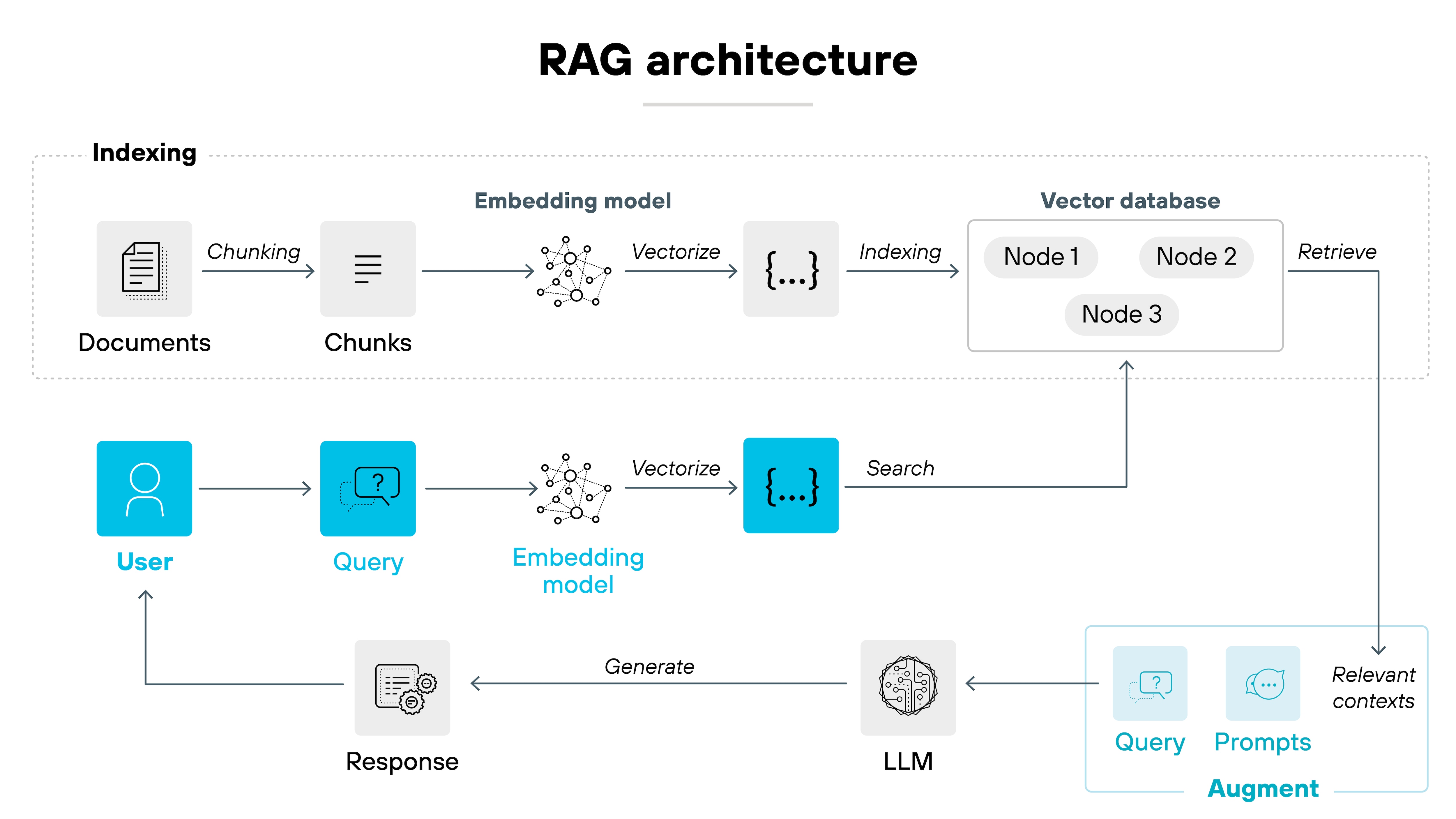
Visual: RAG pipeline showing documents → chunks → embeddings → vector database → retrieval → LLM → response. Source: Palo Alto Networks.
Why use RAG?
Suppose you build a college AI assistant.
Your model may not have your college's latest:
- Course documents
- Rules
- Notices
- Internal documentation
Instead of retraining the whole model, your application can:
Question
   ↓
Search college knowledge base
   ↓
Retrieve relevant passages
   ↓
Give passages to LLM
   ↓
Generate answer from that context
This is one of the major software-engineering patterns around LLM applications.
The provided notes describe RAG as embeddings/vector search + context-window injection, and highlight that it can use private documents without putting those documents into the model's base weights. fileciteturn1file1L3-L3
13. Hallucinations — When Fluent ≠ True
One of the most important LLM concepts:
Fluency is not the same as truth.
A language model is designed to generate likely continuations of text.
If it does not have reliable information available, it can still generate something that sounds convincing.
That is commonly called a hallucination.
Simple example
Imagine asking a model for a specific citation.
It might produce:
Author → plausible
Paper title → plausible
Year → plausible
Journal → plausible
The response can look professional while still being incorrect.
The key lesson:
Confident wording
       ≠
Verified fact
The notes explain hallucination as statistically plausible but factually incorrect output generated by a probabilistic system. fileciteturn1file1L4-L4
14. Why Grounding Helps
A raw LLM mainly relies on patterns represented in its learned parameters.
A grounded system can provide external information at request time.
RAW LLM

Question
   ↓
Model
   ↓
Generated answer
versus:
GROUNDED SYSTEM

Question
   ↓
Retrieve relevant information
   ↓
Verified context
   ↓
Model
   ↓
Answer
This does not magically make every answer correct, but it gives the system a stronger source of evidence.
The source notes describe a production reliability stack:
1. Grounding
       ↓
2. Retrieval
       ↓
3. Citations
       ↓
4. Structured validation
       ↓
5. Human review
For high-stakes areas such as medical, legal, or financial actions, the notes include human review as the final layer. fileciteturn1file1L4-L4
15. Knowledge Cutoff vs Real-Time Information
A model trained on data ending at a particular point does not automatically know events that happened afterward.
A useful distinction is:
Training
   ↓
Knowledge represented in model weights

New event happens
   ↓
Not automatically added to weights
To obtain current information, an AI application can use:
- Search
- External tools
- RAG
- Other live data sources
The provided notes explicitly connect knowledge cutoff with the need for search, tools, or RAG when real-time information is required. fileciteturn1file2L5-L5
16. Open Models vs Closed API Models
AI models can be consumed in different ways.
The provided AI Landscape notes compare open models with closed API models.
Open models
You can download the model weights and potentially run them yourself.
The notes use examples such as:
- Llama
- Mistral
- Gemma
Closed API models
You send requests to a provider-managed API.
The notes use examples such as:
- GPT-4o
- Claude 3.5
- Gemini
The trade-offs include:
| Dimension | Open Model | Closed API |
|---|---|---|
| Ownership | Downloadable weights | Managed API |
| Privacy | Can be self-hosted | Data travels through provider infrastructure according to API terms |
| Customization | More control | Depends on provider |
| Operations | You manage infrastructure | Provider manages infrastructure |
| Pricing | Compute cost | Usually usage-based API cost |
| Failure mode | Your infrastructure | Provider outages/rate limits/policy changes |
These are engineering trade-offs rather than simply a question of which model is "best." fileciteturn1file0L1-L1
17. Choosing a Model Is an Engineering Decision
The AI Landscape notes present three simplified model-size classes:
Small Model
~7B

      ↓

Mid-Size Model
~70B

      ↓

Frontier Model
400B+
They compare models across dimensions such as:
- Cost
- Latency
- Capability
- Deployment
- Privacy
- Throughput
A simplified mental model:
Smaller
↓
Cheaper
Faster
Easier to deploy

Larger
↓
More expensive
More compute
Potentially broader capabilities
The important engineering lesson is:
Choose a model according to the problem and system constraints, not simply according to parameter count or benchmark position.
For example:
- A fast small model may work well for routing.
- A mid-size model may suit general application workloads.
- A frontier model may be used selectively for complex reasoning or coding.
The source describes selective routing as one possible strategy: start with a smaller model and escalate when needed. fileciteturn1file0L2-L2
18. Where Does AI Actually Sit in a Software Stack?
This is one of the most useful ideas for a software engineering student:
AI does not replace the software stack. It becomes another layer inside it.
A simplified AI application can look like:
┌─────────────────────────────┐
│ 1. User Interface            │
│    Web / Mobile              │
├─────────────────────────────┤
│ 2. Application Code          │
│    Business logic / Auth     │
│    State / Database          │
├─────────────────────────────┤
│ 3. Tools & Functions         │
│    Search / SQL / Email      │
│    APIs / Python             │
├─────────────────────────────┤
│ 4. RAG / Vector Store        │
│    Private knowledge         │
├─────────────────────────────┤
│ 5. Foundation Model / LLM    │
│    Probabilistic component   │
├─────────────────────────────┤
│ 6. Guardrails & Validation   │
│    Schemas / Tests / Filters │
└─────────────────────────────┘
This means an AI product still needs normal engineering:
- Frontend
- Backend
- Authentication
- Databases
- APIs
- Tests
- Validation
- Deployment
- Monitoring
- Security
The model is one component inside the system.
The AI Landscape notes summarize this as:
The model provides intelligence; your code provides structure, data, retrieval, tools, and verification.
fileciteturn1file0L3-L3
19. A Complete Mental Model
Now connect everything.
                    AI
                     │
                     ▼
              Machine Learning
                     │
                     ▼
              Deep Learning
                     │
                     ▼
          Generative AI / LLMs
                     │
          ┌──────────┴──────────┐
          ▼                     ▼
       Training              Inference
          │                     │
    ┌─────┴─────┐         ┌─────┴─────────┐
    ▼           ▼         ▼               ▼
   Data      Parameters  Tokens         Context
    │           │         │               │
    └─────┬─────┘         └──────┬────────┘
          ▼                      ▼
      Learned model        Current request
                                  │
                         ┌────────┴────────┐
                         ▼                 ▼
                    Embeddings           Tools
                         │                 │
                         ▼                 │
                    Vector Search          │
                         │                 │
                         └────────┬────────┘
                                  ▼
                                 RAG
                                  │
                                  ▼
                              LLM output
                                  │
                         ┌────────┴─────────┐
                         ▼                  ▼
                    Validation          Citations
                         │
                         ▼
                    Production App
The core idea:
Training creates the learned model. Inference uses that model to generate predictions. Production systems add context, retrieval, tools, validation, and normal software engineering around it.
20. The 9-Stage AI Lifecycle
The AI Landscape notes give this compact lifecycle:
1. Data
   ↓
2. Training
   ↓
3. Parameters
   ↓
4. Tokens
   ↓
5. Context
   ↓
6. Embeddings
   ↓
7. Prediction
   ↓
8. Grounding / RAG
   ↓
9. Production App
This is a useful revision spine for the entire topic. fileciteturn1file0L4-L4
21. Common Misunderstandings
"AI is the same thing as Machine Learning."
Not exactly.
AI is the broad umbrella. ML is one approach within AI.
"A parameter is a stored fact."
No.
A parameter is a learned numerical value. It is not equivalent to a sentence, document, or database row.
"More parameters always means a better model."
No.
Larger models can bring broader capabilities but also higher compute, cost, and latency. The right model depends on the task.
"The context window is permanent memory."
No.
Context is the information available to the model during a request. External databases can provide longer-term storage.
"Fine-tuning is how I add my company's documents to an LLM."
Not necessarily.
For private factual knowledge, the provided notes recommend RAG as a practical alternative because documents can be retrieved when needed.
"If an LLM sounds confident, it must know the answer."
No.
Fluency and factual correctness are different things.
"AI replaces normal software engineering."
The provided AI Landscape notes make the opposite point: AI becomes a component inside a normal software stack.
"A model knows everything that happened yesterday."
Not automatically.
Current information generally requires a live source such as search, tools, or RAG.
22. What This Means for a Software Engineer
Understanding AI at this level changes how you look at AI products.
When you use an AI coding assistant, you can start asking:
What model is behind this?
        ↓
What information is inside the context?
        ↓
Is external knowledge being retrieved?
        ↓
Are tools being called?
        ↓
How is the output validated?
        ↓
What happens if the model is wrong?
When building an AI application, the model is only one piece.
You may need to design:
- API/backend architecture
- Data pipelines
- Retrieval systems
- Vector databases
- Prompt/context construction
- Tool calling
- Validation
- Testing
- Authentication
- Deployment
- Monitoring
- Human review for high-stakes workflows
This is where AI knowledge and software engineering meet.
23. Quick Revision
AI hierarchy
AI
└── ML
    └── Deep Learning
        └── Generative AI / LLMs
Learning loop
Input → Prediction → Loss → Backpropagation → Weight update → RepeatModel pipeline
Data → Clean → Tokenize → Pre-train → Evaluate → Fine-tune → DeployLLM operational concepts
Tokens → Context → Embeddings → Retrieval → RAG → GenerationReliability
Grounding → Retrieval → Citations → Validation → Human ReviewProduction architecture
UI
↓
Application Code
↓
Tools / Functions
↓
RAG / Vector Store
↓
LLM
↓
Guardrails / Validation
24. Master Glossary
| Term | Simple meaning |
|---|---|
| AI | Broad field of making machines perform tasks associated with human intelligence. |
| Machine Learning | Learning statistical patterns from data. |
| Deep Learning | ML based on multi-layer neural networks. |
| LLM | Large language model capable of processing and generating language. |
| Parameter | Learned numerical value inside a model. |
| Loss | Numerical measure of prediction error. |
| Backpropagation | Method used during training to determine parameter updates from error. |
| Token | A numbered piece of text processed by a language model. |
| Context Window | Maximum token capacity available to a model for a request. |
| Embedding | Numerical vector representing semantic information. |
| Vector Database | Storage/search system for vectors, often used for semantic retrieval. |
| Cosine Similarity | A measure used to compare the direction of vectors. |
| RAG | Retrieval-Augmented Generation: retrieve relevant information and provide it to the model as context. |
| Hallucination | Fluent but factually incorrect model output. |
| Fine-Tuning | Updating a pre-trained model for specific behavior, formats, styles, or tasks. |
| Quantization | Reducing numerical precision of model weights to reduce memory/cost and potentially improve inference efficiency. |
| Inference | Using a trained model to generate predictions/outputs. |
| Grounding | Providing external evidence/context to constrain or support model responses. |
| Guardrails | Rules, filters, validation, or tests around model behavior. |
| Knowledge Cutoff | The point after which training data is not represented in the model's learned knowledge. |
25. Final Takeaways
If you remember only a few things, remember these:
- AI is an umbrella; LLMs are one part of the larger AI landscape.
- Machine learning shifts some logic from hand-written rules to patterns learned from data.
- Training adjusts numerical parameters using prediction error.
- Billions of parameters mean billions of learned numerical values — and they require serious compute and memory.
- Tokens are the units an LLM processes.
- The context window is working space, not permanent memory.
- Embeddings turn semantic information into vectors that can be compared.
- RAG lets an application retrieve external information and place it into the model's context.
- A fluent answer is not automatically a truthful answer.
- Fine-tuning and RAG solve different problems.
- Model selection is an engineering trade-off involving capability, cost, latency, privacy, deployment, and throughput.
- AI applications still require normal software engineering.
- The model provides a probabilistic component; your application provides structure, data, retrieval, tools, and verification.
Visual Sources & Attribution
The visuals are intentionally limited to major conceptual clusters so the document remains a learning resource rather than an image gallery.
- AI hierarchy: Wikimedia Commons, AI hierarchy.svg — CC BY-SA 4.0.
- Neural network: Wikimedia Commons, Artificial neural network.svg — CC BY-SA 3.0 / GFDL.
- Deep learning: Wikimedia Commons, Deep Learning.jpg — CC BY-SA 4.0.
- Transformer: Wikimedia Commons, Transformer, one encoder-decoder block, detailed view.png — CC BY 4.0.
- Embeddings: IBM, RAG Cookbook — Embeddings.
- RAG: Palo Alto Networks, What Is Retrieval-Augmented Generation?
The visuals are linked from their original sources rather than copied into the Markdown file, so the document remains lightweight and the source/license information stays visible.
Sources & Further Learning
This resource was created from the three provided course PDFs:
- AI Understanding Basics.pdf — AI hierarchy, rule-based vs learning-based systems, training, loss, parameters, GPU compute, model-building pipeline, fine-tuning.
- AI LLM Important Terms.pdf — tokens, context windows, embeddings, RAG, semantic search, hallucinations, reliability.
- AI Landscape.pdf — open vs closed models, model-selection trade-offs, software-stack architecture, AI lifecycle.
Source note: The learning content is grounded primarily in the three provided PDFs. External web research was used specifically to find relevant educational visuals and check their source/license information; it was not used to silently expand the course content with unrelated technical material.
One Mental Model to Keep
DATA
 ↓
TRAINING
 ↓
LEARNED PARAMETERS
 ↓
MODEL
 ↓
TOKENS + CONTEXT
 ↓
PREDICTION
 ↓
RETRIEVAL / TOOLS WHEN NEEDED
 ↓
VALIDATION
 ↓
SOFTWARE APPLICATION
AI can provide powerful capabilities, but understanding the system around the model is what lets an engineer build with it responsibly.