mdview Desktop · Free beta
Markdown viewer app for Windows and Mac
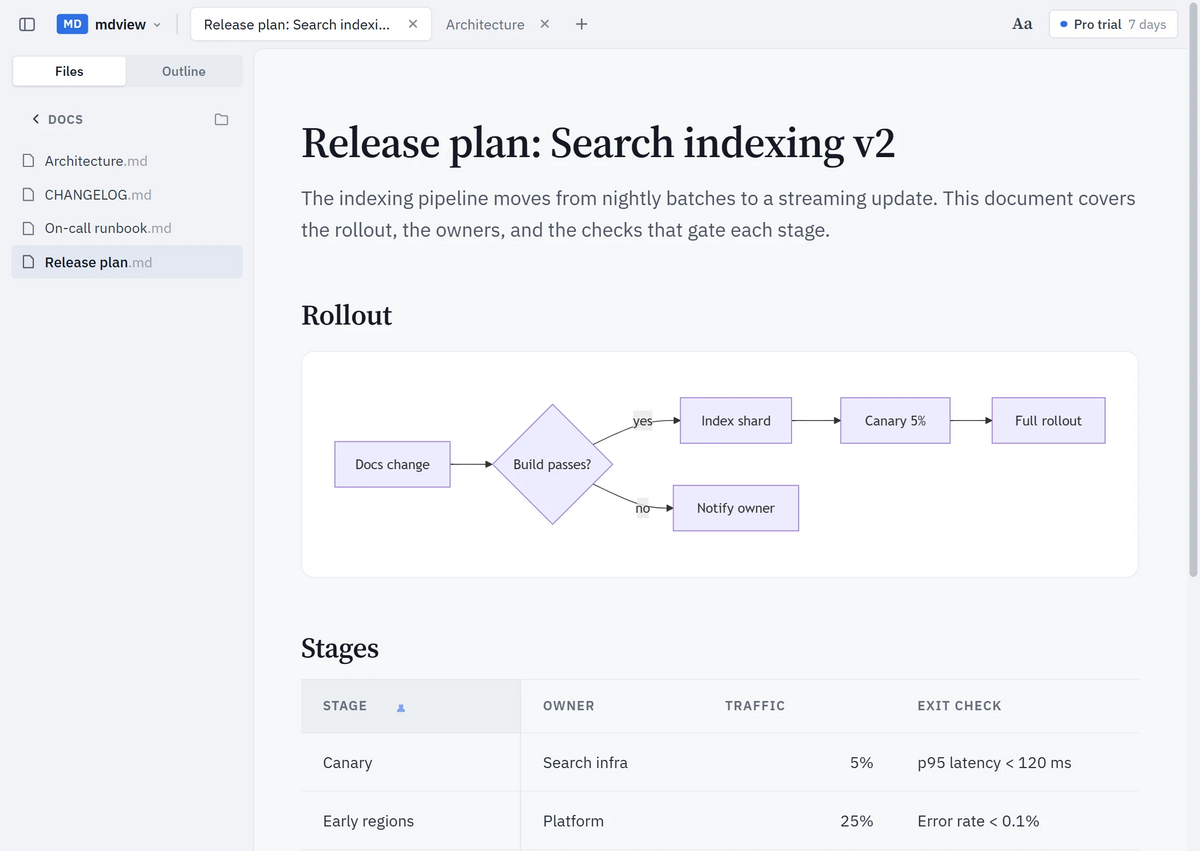
Double-click a .md file and read it formatted — tables, code, and Mermaid diagrams included. A fast, local Markdown reader that works offline and never uploads your files.
Available for Windows 11. macOS coming soon.
The beta installer isn't code-signed yet. If your browser holds the download back as “not commonly downloaded”, open Downloads (Ctrl+J) and choose Keep. If Windows SmartScreen appears, choose More info → Run anyway.
Which app opens .md files on Windows?
Recent Windows 11 Notepad versions can show basic formatted Markdown, while older versions may show the source. mdview Desktop is built for reading full documents, including Mermaid diagrams and local folders. Make it the app for Markdown files once, and every double-click opens a formatted document.
- Download mdview Desktop for Windows 11, run the installer, and keep “Add mdview to Open With” ticked.
- Right-click any .md file, choose Open with → Choose another app, pick mdview, and select Always.
- From now on, double-click a .md or .markdown file and it opens formatted.
Everything you need to read Markdown
Formatted Markdown
GitHub-flavored Markdown with tables, task lists, footnotes, and syntax-highlighted code blocks — not raw # and ** characters.
Mermaid diagrams, rendered natively
Flowcharts, sequence, Gantt, timeline, class, state, ER, and more draw as crisp SVG. Zoom, go full screen, or save a diagram as SVG or PNG.
Tables you can work with
Sort columns, pin a column while you scroll, open a wide table full screen, and copy it as Markdown or CSV.
Folders and linked documents
Browse the Markdown files in a folder, follow relative links between documents, and keep several files open in tabs.
Live reload
The document re-renders when the file is saved — in your editor or by an AI agent — and keeps your reading position.
Private and offline
Files are rendered on your computer. Reading needs no account, no upload, and no internet connection.
Large files
Opens documents up to 25 MB; long files render lazily as you scroll, so they open fast.
Comfortable reading
Table of contents, light and dark themes that follow Windows, and your choice of text size and line spacing.
mdview.io Web vs mdview Desktop
| Feature | mdview.io Web | mdview Desktop |
|---|---|---|
| Shows formatted text | Yes | Yes |
| Mermaid diagrams | Yes | Yes |
| Opens formatted on double-click by default | No | Yes |
| Works without internet | No | Yes |
| Built for reading, not editing | Yes | Yes |
| Browse folders and follow local links | No | Yes* |
| Live reload after file changes | No | Yes* |
| LaTeX math | Yes | Not yet |
| Export a rendered PDF | Yes | Not yet |
| Share a rendered document by link | Yes | No |
| No app installation needed | Yes | No |
* Requires mdview Desktop Pro.
Free to read. Pro when you live in Markdown.
Free
- Open and read any .md or .markdown file
- Table of contents
- Mermaid diagrams and tables
- Syntax highlighting
- Large files
Pro
- Tabs and folder browsing
- Linked documents
- Live reload and session restore
- Reader font, size, and spacing
- Table sort, pin, copy, and export
- Diagram zoom, full screen, and SVG/PNG export
- One-click code copy
Your first launch includes a 7-day Pro trial. An mdview.io Pro account activates Pro on up to three computers.
System requirements
- Windows 11 (64-bit). Windows 11 on ARM should also work.
- About 60 MB of disk space.
- An internet connection is needed only if Microsoft WebView2 has to be installed during setup; it is already included in Windows 11.
- macOS: coming soon.
- Windows 10 and Linux are not supported yet.
mdview Desktop 0.1.0-beta.1 for Windows · mdview-0.1.0-beta.1-windows-x64-setup.exe · SHA-256 5a63b39645122543fe37b735fddb757bbf78f4c562f0586673e3318ff032dc3d
Frequently asked questions
Which app opens .md files on Windows?
Recent Windows 11 Notepad versions can show basic formatted Markdown, while older versions may show plain text. mdview Desktop is a reading-focused app for full documents, including Mermaid diagrams and local folders — set it as the app for .md files and a double-click opens the formatted document. If you can’t install anything, open the file in your browser at mdview.io.
Is mdview Desktop free?
Yes. The Free plan opens and reads any Markdown file, with the table of contents, Mermaid diagrams, and tables. Pro adds tabs, folder browsing, live reload, and advanced table and diagram tools; your first launch includes a 7-day Pro trial, and an mdview.io Pro account activates Pro on up to three computers.
Does it work offline?
Yes. Markdown and diagrams are rendered on your computer, and documents never leave it. The app contacts mdview.io only to activate or renew a Pro licence and, if you leave usage statistics on, to send one anonymous signal a day: app version, plan, and how many files were opened — never file names, paths, or contents. You can turn usage statistics off under Preferences → Privacy.
Does it render Mermaid diagrams?
Yes. Mermaid code blocks are drawn natively as SVG — flowcharts, sequence, Gantt, timeline, class, state, ER, and other diagram types — with zoom, full screen, and SVG or PNG export.
Can it open .mmd Mermaid files?
Not yet: mdview Desktop opens .md and .markdown files. Put the diagram in a ```mermaid code block inside a .md file, or open the .mmd file in the browser with the mdview.io Mermaid viewer.
Can I print Markdown or render LaTeX math?
Not in the desktop beta. The mdview.io web viewer renders LaTeX math and exports Markdown to PDF for printing.
Is it a Markdown editor?
No. mdview Desktop is a read-only reader. Keep writing in your usual editor — mdview re-renders the document every time you save.
Does it work on Windows 10 or Linux?
Not yet. mdview Desktop needs Windows 11 (64-bit); Windows 11 on ARM should also work. On Windows 10 or Linux, open Markdown files in your browser at mdview.io.
Is there a Mac version?
macOS is coming soon. Leave your email on this page and we’ll tell you when the Mac version is ready.
Why does Windows show a SmartScreen warning?
The beta installer isn’t code-signed yet, so Windows SmartScreen may say it “prevented an unrecognized app from starting”. Choose More info, then Run anyway. The download is served from mdview.io, and its SHA-256 checksum is listed on this page.
The download doesn’t start or my browser blocked it. What do I do?
Chrome and Edge sometimes hold back new, unsigned installers as “not commonly downloaded”. Open your browser’s Downloads list (Ctrl+J), find the mdview installer, and choose Keep (in Edge: … → Keep, then Keep anyway). The file then saves normally.
Related guides
Need to read a file right now? Open it in the browser, or view a Mermaid diagram in the Mermaid viewer.